AI-Powered Reviews & RAG
Welcome to the cutting edge of automated code review! While deterministic rules excel at catching specific patterns, AI-powered reviews unlock a new level of code quality enforcement. Ship Guard's AI capabilities can understand context, catch nuanced issues, and enforce complex policies that would be impossible to capture with simple pattern matching.
Combined with Retrieval-Augmented Generation (RAG), the AI has access to your team's specific knowledge base for truly intelligent reviews that understand your architectural decisions, coding standards, and business context.
📋 What You'll Learn
By the end of this guide, you'll understand:
- ✅ How AI-powered rules work and when to use them
- ✅ The difference between
ai-reviewandpolicy-questionrules - ✅ How to configure RAG (Retrieval-Augmented Generation) for context-aware reviews
- ✅ Best practices for writing effective AI prompts
- ✅ AI review quotas and usage management
- ✅ Security considerations and cost optimization strategies
🧠 Understanding AI-Powered Reviews
When to Use AI vs. Deterministic Rules
| Scenario | Use Deterministic | Use AI |
|---|---|---|
| Simple pattern matching | ✅ banned-terms, max-file-size | ❌ |
| Complex logic with context | ❌ | ✅ Error handling, accessibility |
| Team-specific policies | ❌ | ✅ Architecture compliance |
| Performance critical | ✅ Fast, predictable | ❌ Higher latency |
| Quota sensitive | ✅ No quota usage | ❌ Counts toward monthly limit |
The Two Types of AI Rules
ai-review- Analyzes code changes (the diff) with contextpolicy-question- Answers policy questions using your knowledge base
Both rule types count toward your monthly AI review quota. See the Billing FAQ for plan limits.
📊 AI Review Quotas
AI-powered rules consume your monthly quota based on your plan:
| Plan | AI Reviews/Month | Best For |
|---|---|---|
| HOBBY | 500 | Small teams, light AI usage |
| PRO | 1,500 | Growing teams, moderate usage |
| SCALE | 5,000 | Large teams, heavy usage |
What Counts as an AI Review?
Each execution of an ai-review or policy-question rule counts as one AI review:
rules:
  - name: 'Error handling check'
    condition: 'ai-review'  # ✅ Counts toward quota

  - name: 'TODO comments'
    condition: 'banned-terms'  # ❌ Does NOT count toward quota
Monitoring Your Usage
Track your AI review consumption in real-time:
- Visit your Dashboard → Settings → Billing
- View AI Reviews Used for the current billing period
- Set up alerts at 75% and 90% of quota
What Happens When You Hit Your Quota?
When you reach your monthly AI review limit:
- ✅ Deterministic rules continue working normally
- ⚠️ AI-powered rules are paused until the next billing cycle
- 📧 You'll receive notifications when approaching and reaching the limit
- 🔄 Quota resets automatically on your billing anniversary
Solution: Upgrade to a higher tier for more AI reviews. See Billing FAQ for details.
🔍 The ai-review Rule
The ai-review rule analyzes actual code changes in your pull request, understanding both the context and the modifications to provide intelligent feedback.
Parameters
| Parameter | Type | Required | Default | Description |
|---|---|---|---|---|
prompt | string | ✅ Yes | — | Instructions for what the AI should look for |
severity | string | ❌ No | Uses global setting | "error" or "warning" |
paths | array | ❌ No | All files | File patterns to analyze |
excludePaths | array | ❌ No | — | File patterns to skip |
Writing Effective Prompts
The key to successful AI reviews lies in crafting clear, specific prompts. Here are some guidelines:
✅ DO:
- Be specific about what you want checked
- Provide context about your team's standards
- Include examples of what to look for
- Focus on one concern per rule
- Use clear criteria for violations
❌ DON'T:
- Write vague prompts like "check if code is good"
- Ask for subjective style opinions
- Include sensitive information in prompts
- Create overly complex multi-part instructions
- Waste quota on rules that could be deterministic
🎯 Real-World AI Review Examples
Example 1: Error Handling Review (Node.js/TypeScript)
- name: 'Proper error handling in API routes'
  condition: 'ai-review'
  severity: 'error'
  paths:
    - 'src/api/**'
    - 'src/routes/**'
  parameters:
    prompt: |
      You are a senior backend engineer. Analyze only the changes in the PR.
      For each changed file, find instances where asynchronous operations
      (promises, async functions, callbacks) may result in unhandled errors
      or uncaught rejections, and where thrown errors are not translated into
      proper HTTP responses or logs.
Why this works:
- ✅ Narrow scope (async & error handling only)
- ✅ Clear criteria for violations
- ✅ Targets specific paths to optimize quota usage
Quota Impact: 1 AI review per PR (efficient targeting)
Example 2: React Component Accessibility
- name: 'Accessibility compliance for React components'
  condition: 'ai-review'
  severity: 'warning'
  paths:
    - 'src/components/**/*.tsx'
    - 'src/components/**/*.jsx'
  parameters:
    prompt: |
      You are an accessibility engineer. Inspect only the changed React components.
      Identify accessibility regressions or missing accessibility features:
      - missing ARIA roles where needed,
      - non-semantic elements used for interactive UI without keyboard handlers,
      - images missing alt text (or alt text that is just file name),
      - form controls missing labels,
      - color contrast issues (call out potential problems).
Quota Impact: 1 AI review per PR with component changes
Example 3: Database Query Performance
- name: 'Database query efficiency review'
  condition: 'ai-review'
  severity: 'warning'
  paths:
    - 'src/models/**'
    - 'src/database/**'
    - '**/*Repository.js'
  parameters:
    temperature: 0.0
    prompt: |
      Analyze database queries for performance issues:

      1. Are there N+1 query problems?
      2. Are queries using appropriate indexes?
      3. Are large datasets being loaded without pagination?
      4. Are unnecessary JOINs or complex queries being used?

      Consider our current database schema and typical data volumes.
      Flag potential performance bottlenecks that could impact production.
Quota Impact: 1 AI review per PR with database changes
Example 4: Security Vulnerability Detection
- name: 'Security best practices enforcement'
  condition: 'ai-review'
  severity: 'error'
  paths:
    - 'src/api/**'
    - 'src/auth/**'
  parameters:
    prompt: |
      You are a senior security engineer. Inspect **only** the changed lines in the PR.
      Look for insecure patterns, misuse of crypto APIs, leaking of PII, or incorrect
      sanitization. For each issue return JSON items:
      { "file", "line", "severity", "summary", "recommendation", "evidence" }
    outputFormat: 'json-v1'
Quota Impact: 1 AI review per PR with security-sensitive changes
❓ The policy-question Rule
The policy-question rule doesn't analyze code changes—instead, it asks questions about the pull request as a whole to enforce team policies and architectural decisions.
Parameters
| Parameter | Type | Required | Description |
|---|---|---|---|
prompt | string | ✅ Yes | The policy question to ask |
severity | string | ❌ No | "error" or "warning" |
rag_sources | array | ❌ No | Knowledge sources to consult |
When to Use Policy Questions
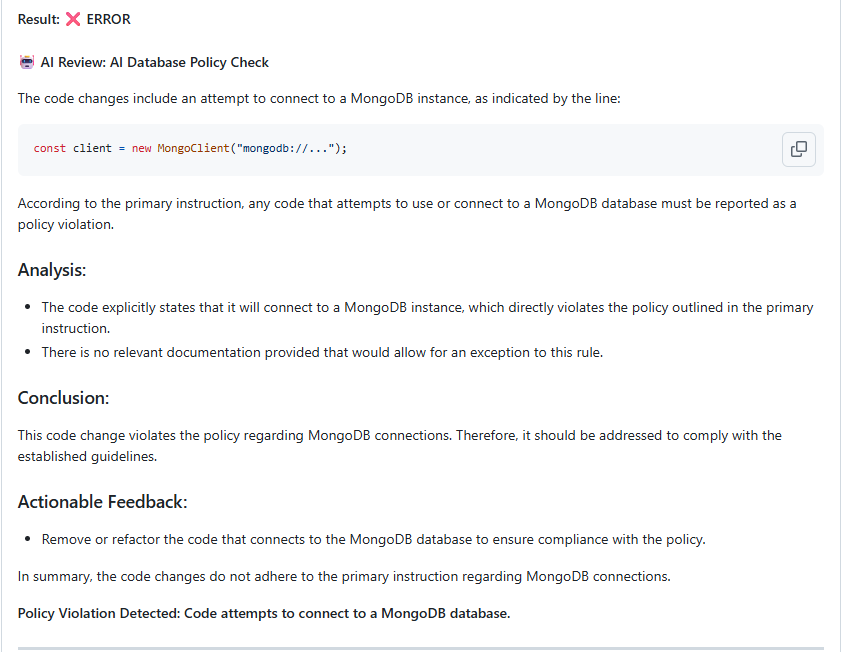
- Technology stack compliance (e.g., "Is MongoDB allowed?")
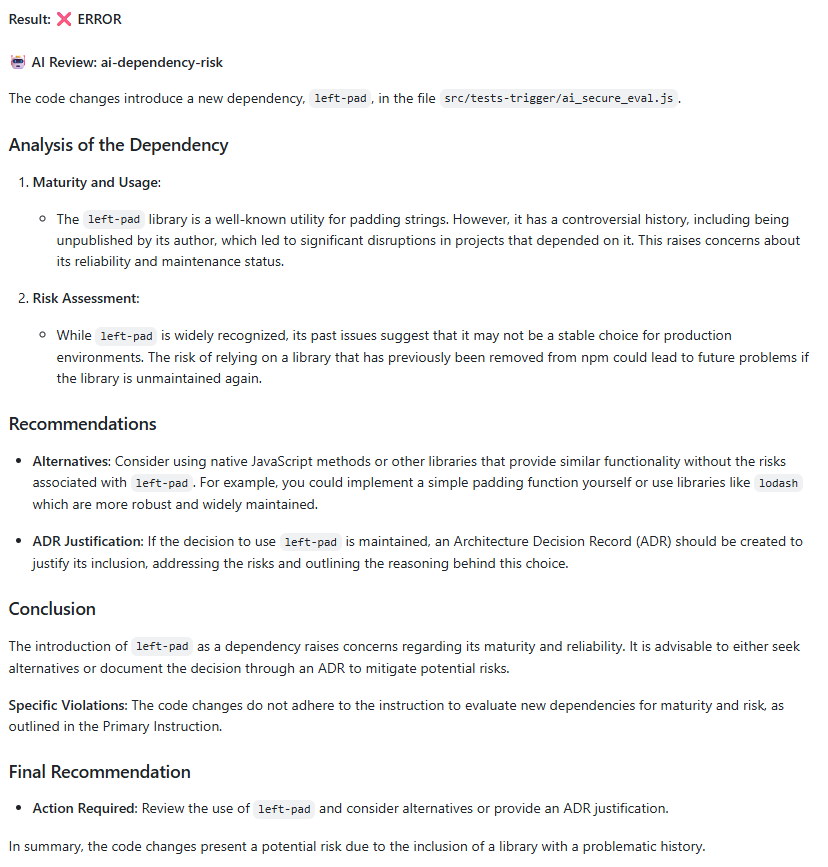
- External dependency review (e.g., "Are new third-party services approved?")
- Architecture decision validation (e.g., "Does this follow our established patterns?")
- Security policy enforcement (e.g., "Does this change require security review?")
Note: Each policy-question rule counts as 1 AI review per PR, regardless of PR size.
Example: Technology Stack Compliance
- name: 'Database technology compliance'
  condition: 'policy-question'
  severity: 'error'
  parameters:
    prompt: |
      Based on the files changed in this PR, is the developer introducing
      or using MongoDB? Our team policy requires PostgreSQL for all new
      database implementations. If MongoDB usage is detected, explain why
      it violates our architecture standards.
Quota Impact: 1 AI review per PR
Example: External Dependencies
- name: 'External service dependency review'
  condition: 'policy-question'
  severity: 'warning'
  parameters:
    prompt: |
      Does this PR introduce any new external API calls or third-party service
      integrations? If so, have they been approved through our vendor review
      process? Flag any new external dependencies that need security review.
Quota Impact: 1 AI review per PR
📚 The Knowledge Base (RAG)
RAG stands for Retrieval-Augmented Generation. It's a fancy way of saying we give our AI a "cheat sheet" before it reviews your code. This cheat sheet is your own documentation—your READMEs, architectural decision records (ADRs), and contribution guides.
How RAG Works
- Index Creation: Ship Guard scans your specified documentation files
- Context Retrieval: When reviewing code, relevant documentation is retrieved
- Informed Analysis: The AI uses both the code and your docs to make decisions
Configuring RAG Sources
Add a rag_sources section to your configuration file:
# .github/ship-guard.yml
version: 1
default_severity: 'error'

rag_sources:
  - path: 'docs/architecture/**/*.md'
    weight: 1.0
  - path: 'docs/coding-standards.md'
    weight: 0.9
  - path: 'ADR/*.md' # Architecture Decision Records
    weight: 0.8
  - path: 'README.md'
    weight: 0.6
  - path: 'docs/api/**'
    weight: 0.7

rules:
  # Your AI rules here...
RAG Source Parameters
| Parameter | Type | Required | Default | Description |
|---|---|---|---|---|
path | string | ✅ Yes | — | Glob pattern for documentation files |
weight | number | ❌ No | 0.5 | Relevance weight (0.0-1.0) |
Weight Guidelines
| Weight | Meaning | Example Use Case |
|---|---|---|
0.9-1.0 | Critical documentation | ADRs, security policies |
0.7-0.8 | Important standards | Style guides, API contracts |
0.4-0.6 | Helpful context | General documentation |
0.1-0.3 | Background info | READMEs, onboarding docs |
Path Patterns for RAG
RAG supports flexible glob patterns to include relevant documentation:
rag_sources:
  # Architecture Decision Records (high priority)
  - path: 'docs/adr/*.md'
    weight: 1.0

  # API documentation
  - path: 'docs/api/**/*.{md,yaml,json}'
    weight: 0.8

  # General guidelines
  - path: 'docs/guides/**'
    weight: 0.6

  # Code examples and templates
  - path: 'examples/**/*.{js,ts,py}'
    weight: 0.7
RAG and Quota Usage
Good news: RAG doesn't consume additional quota! The AI review quota is only charged when the rule executes, regardless of whether RAG sources are used.
🎯 Complete Example: AI-Powered Configuration
Here's a comprehensive example showing AI rules working with RAG:
# .github/ship-guard.yml
version: 1
default_severity: 'error'

rag_sources:
  - path: 'docs/architecture/*.md'
    weight: 1.0
  - path: 'docs/security-guidelines.md'
    weight: 0.9
  - path: 'docs/coding-standards/**'
    weight: 0.8
  - path: 'README.md'
    weight: 0.6

rules:
  # Security review with team context
  - name: 'Security best practices enforcement'
    condition: 'ai-review'
    prompt: |
      Review this code for security vulnerabilities using our team's
      security guidelines. Pay special attention to:

      1. Input validation and sanitization
      2. Authentication and authorization checks
      3. Sensitive data handling
      4. SQL injection prevention

      Reference our security documentation when making recommendations.
    severity: 'error'
    paths: ['src/api/**', 'src/auth/**']

  # Architecture compliance
  - name: 'Architecture decision compliance'
    condition: 'policy-question'
    prompt: |
      Does this PR follow our established architectural patterns and
      decision records? If it introduces new patterns or deviates from
      established ones, does it need architectural review?
    severity: 'warning'

  # Code style with context
  - name: 'Team coding standards review'
    condition: 'ai-review'
    prompt: |
      Check if this code follows our team's coding standards as documented.
      Look for:

      - Consistent naming conventions
      - Proper error handling patterns
      - Code organization and structure
      - Comment and documentation quality

      Only flag clear violations of documented standards.
    severity: 'warning'
    excludePaths: ['test/**', 'scripts/**']
Quota Impact for this Configuration:
- If a PR touches API code: 2 AI reviews (security + policy question)
- If a PR touches non-API code: 2 AI reviews (policy question + coding standards)
- Efficient targeting minimizes quota consumption
💡 Optimizing AI Review Usage
Smart Quota Management
Make the most of your AI review quota with these strategies:
1. Target Critical Paths
# ✅ GOOD: Specific paths
- name: 'Security review'
  condition: 'ai-review'
  paths: ['src/api/**', 'src/auth/**']

# ❌ WASTEFUL: Reviews all files
- name: 'Security review'
  condition: 'ai-review'
  # No paths specified
2. Use Deterministic Pre-Filters
# First, catch obvious issues with deterministic rules
- name: 'No console.log in production'
  condition: 'banned-terms'
  parameters:
    terms: ['console.log']
    paths: ['src/**']
    excludePaths: ['src/**/*.test.js']

# Then use AI for complex logic
- name: 'Proper logging implementation'
  condition: 'ai-review'
  paths: ['src/**']
  excludePaths: ['src/**/*.test.js']
  parameters:
    prompt: |
      Check if logging is properly implemented using our Winston logger.
      Ensure appropriate log levels are used.
3. Exclude Non-Critical Files
- name: 'Code quality review'
  condition: 'ai-review'
  paths: ['src/**']
  excludePaths:
    - 'test/**'
    - 'scripts/**'
    - '**/*.config.js'
    - 'docs/**'
    - '**/*.md'
4. Combine Multiple Checks
# ❌ WASTEFUL: 3 separate AI reviews
- name: 'Check error handling'
  condition: 'ai-review'

- name: 'Check input validation'
  condition: 'ai-review'

- name: 'Check logging'
  condition: 'ai-review'

# ✅ EFFICIENT: 1 AI review with multiple concerns
- name: 'Backend quality review'
  condition: 'ai-review'
  parameters:
    prompt: |
      Review this code for:
      1. Proper error handling and try-catch blocks
      2. Input validation and sanitization
      3. Appropriate logging implementation
5. Use Severity Strategically
# Start with warnings to test before consuming quota on errors
- name: 'Experimental AI check'
  condition: 'ai-review'
  severity: 'warning'  # Won't block PRs during testing
  parameters:
    prompt: |
      Test prompt for new AI rule...
Quota Monitoring Best Practices
- Set up usage alerts in your dashboard
- Review AI rule effectiveness monthly
- Disable or refine underperforming rules
- Monitor false positive rates
- Adjust paths based on actual usage patterns
🔒 Security & Best Practices
Prompt Security
All prompts are automatically sanitized to prevent injection attacks. Ship Guard strips potentially harmful instructions while preserving your intent.
Writing Better Prompts
✅ DO:
- Be specific about what to check
- Provide clear criteria for violations
- Reference your team's standards
- Focus on actionable feedback
- Test prompts on sample PRs first
❌ DON'T:
- Write vague prompts like "check if code is good"
- Ask for subjective style opinions
- Include sensitive information in prompts
- Create overly complex multi-part instructions
- Use AI when deterministic rules would work
Pro Tip: Start with HOBBY, monitor usage for a month, then adjust your plan.
Effective RAG Setup
- Keep documentation current: Outdated docs lead to poor AI decisions
- Use consistent formatting: Well-structured markdown works best
- Weight strategically: Prioritize authoritative sources
- Monitor and iterate: Review AI decisions and adjust sources accordingly
- Update RAG sources regularly: Set calendar reminders to review documentation
🚀 Getting Started with AI Reviews
Step 1: Check Your Plan
Verify your AI review quota:
- Go to Dashboard → Settings → Billing
- Note your plan's monthly AI review limit
- Plan your AI rules accordingly
Step 2: Start Small
Begin with a single AI rule on a test repository:
- name: 'Simple error handling check'
  condition: 'ai-review'
  severity: 'warning'
  paths: ['src/**/*.ts']
  parameters:
    prompt: |
      Check if async functions have proper error handling.
      Look for missing try-catch blocks or unhandled promises.
Expected Usage: 1 AI review per PR with TypeScript changes
Step 3: Add RAG Sources
Gradually add your team's documentation:
rag_sources:
  - path: 'docs/coding-standards.md'
    weight: 0.8
  - path: 'README.md'
    weight: 0.6
Step 4: Monitor and Iterate
- Test on sample PRs
- Check quota consumption in dashboard
- Adjust prompts based on results
- Fine-tune severity levels
- Add more rules as needed
Step 5: Scale Up
Once you're confident in the results:
- Add more AI rules strategically
- Integrate with branch protection
- Monitor costs and quota usage
- Gather team feedback
- Consider upgrading if hitting quota limits
📈 Tracking AI Review Effectiveness
Key Metrics to Monitor
Track these metrics in your dashboard:
- AI Reviews per Month - Are you using your quota efficiently?
- False Positive Rate - How often are AI findings incorrect?
- Time to Resolution - How quickly are AI-flagged issues fixed?
- Rule Effectiveness - Which rules provide the most value?
When to Adjust
Consider refining your AI rules if:
- ❌ Consistently hitting quota limits early in the month
- ❌ High false positive rate (>20%)
- ❌ Team ignoring AI feedback regularly
- ❌ AI rules duplicating deterministic checks
- ❌ Rules not providing actionable feedback
AI REVIEW REPORTS
🎯 What's Next?
Now that you understand AI-powered reviews, you're ready to explore more advanced features:
| Next Step | Description | Link |
|---|---|---|
| 💳 Billing & Subscription | Understanding AI review quotas and plan management | billing.md |
| 📚 Advanced Configuration | Explore team-specific rules, RAG integration, and custom policies | advanced-configuration.md |
| 🔧 Troubleshooting | Common issues and solutions for AI rule configuration | troubleshooting.md |
| ⚙️ Configuring Rules | Complete guide to all rule types | configuring-rules.md |
Pro Tips for Success
- Monitor your quota usage regularly in the dashboard
- Start with warnings before escalating to errors
- Use targeted paths to optimize quota consumption
- Test prompts thoroughly before deploying to production
- Keep RAG sources updated for best results
- Balance AI and deterministic rules for optimal coverage
- Upgrade when needed - don't let quotas block your workflow