Incident Memory: Never Ship The Same Bug Twice
Incident Memory is Ship Guard's most powerful and unique feature. It transforms your team's past production failures into active, automated prevention ensuring you never ship the same bug twice.
📋 Table of Contents
- What is Incident Memory?
- How It Works
- Getting Started
- Adding Your First Incident
- The Incident Workflow
- Best Practices
🎯 What is Incident Memory?
The Problem
Every engineering team has experienced this painful cycle:
- Production bug happens (SQL injection, race condition, memory leak)
- 3am incident response - All hands on deck
- Post-mortem written - Detailed analysis, lessons learned
- Everyone reads it once - "We'll never do this again!"
- 3 months later - Different developer, same bug, new incident
- Repeat from step 1 🔄
Traditional post-mortems are passive documents that gather dust.
The Solution
Ship Guard's Incident Memory turns post-mortems into active, automated prevention:
- Document the incident - Add it to Ship Guard's memory (30 seconds)
- Future PRs get checked - Every code change is compared against past incidents
- Warnings appear automatically - "⚠️ Similar code caused INC-042 in March 2024"
- Bug prevented - Developer sees the warning, fixes the code, crisis averted ✅
Incident Memory is like having a senior engineer who never forgets anything, reviewing every PR.
🔬 How It Works
Traditional keyword matching:
❌ Only catches exact text matches
❌ Misses conceptually similar code
❌ High false positive rate
Ship Guard's:
✅ Understands code intent and patterns
✅ Catches similar vulnerabilities in different languages
Example:
Past Incident (JavaScript):
// INC-042: SQL injection in search
const query = `SELECT * FROM users WHERE name = '${input}'`;
New PR (Python):
# Will be flagged as similar!
query = f"SELECT * FROM customers WHERE email = '{user_email}'"
Even though the code is in different languages, Ship Guard recognizes the same vulnerability pattern: unsanitized user input in SQL queries.
🚀 Getting Started
Prerequisites
- Ship Guard Pro or Scale Tier
💡 -
Scale tier users have access to incident analytics and dashboard
💡 -
Pro tier users can add incident and view comments on their github repo but don't have access to the incident dashboard and analytics
- Admin access to your repository
- At least one documented production incident
💡 Not on Pro or Scale tier? Upgrade here to unlock Incident Memory.
📝 Adding Your First Incident
Web Dashboard
Step 1: Navigate to Incidents Page
Incidents → + Add Incident
Step 2: Fill Out the Form
Step 3: Confirm Submission
After clicking "Add to Memory", you'll see:
✓ Incident added successfully!

Ship Guard is processing this incident. It will be available for
review checks in approximately 30 seconds.
> Chrome Extension, Slack, Discord Bot and API (For Automation) (Coming Soon)
🔄 The Incident Workflow
Full Lifecycle Example
Let's walk through a complete real-world scenario.
1. Production Incident Occurs
June 15, 2025 - 3:42 AM
🚨 PagerDuty Alert: Database Error Spike
   myorg/backend-api - production environment

Error: SQLSTATE[HY000]: General error: 1290 The MySQL server is
running with the --read-only option so it cannot execute this statement

Investigation: Get User Legacy endpoint is vulnerable to SQL injection.
Malicious query: `SELECT * FROM users WHERE id = '${userId}'`--
2. Immediate Response
March 15, 2024 - 4:10 AM
✓ Service rolled back to previous version
✓ Attack mitigated, no data exfiltration confirmed
✓ GitHub issue created: #456
✓ Post-mortem scheduled
3. Post-Mortem Documented
March 16, 2024 - 2:00 PM
Team creates detailed post-mortem:
# Post-Mortem: INC-042 SQL Injection

A critical SQL injection issue was identified in the `getLegacyUser` function.
User input was directly concatenated into a SQL query, allowing attackers to alter database commands.

## Root Cause
The user search endpoint (`GET /api/users`) interpolated the `userId` parameter directly into a raw query without sanitization:

```javascript
// Vulnerable code (removed in fix)
const query = `SELECT * FROM users WHERE id = '${userId}'`;
const user = await db.query(query);
return user.rows[0];
4. Added to Ship Guard Memory
March 16, 2025 - 3:30 PM
Tech lead adds incident via dashboard:
Title: INC-042: SQL Injection in user search endpoint
Severity: CRITICAL
Tags: security, database, sql-injection, user-input, search
Summary: [Full post-mortem text above]
Link: https://github.com/myorg/backend-api/issues/456

✓ Added to memory successfully
5. Weeks Pass, New Feature Developed
June 22, 2025 - 10:15 AM
Junior developer implements a new product search feature:
// src/users/get-user.js
async function getUser(req, res) {
  const userId = req.query.id;

  // Reintroduces the same vulnerability from getLegacyUser
  const sql = `SELECT * FROM users WHERE id = '${userId}'`;
  const result = await db.raw(sql);

  return res.json(result);
}
6. PR Opened
June 22, 2025 - 11:00 AM
Pull Request #789: Add product search feature
Branch: feature/get-users → main
7. Ship Guard Activates
June 22, 2024 - 11:00:15 AM (15 seconds later)
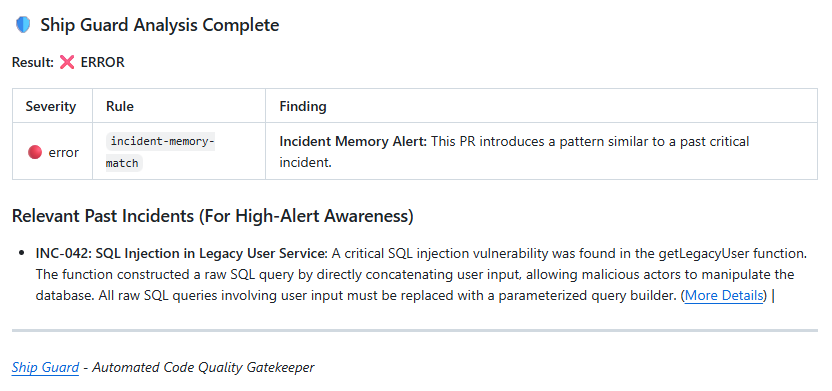
8. Developer Fixes Issue
June 22, 2024 - 11:30 AM
Developer updates code based on Ship Guard's feedback:
// src/users/get-user.js (fixed)
async function getUser(req, res) {
  const userId = req.query.id;

  // Fixed: Use parameterized query to prevent SQL injection
  const sql = 'SELECT * FROM users WHERE id = ?';
  const result = await db.raw(sql, [userId]);

  return res.json(result);
}
Commits with message:
fix: use parameterized queries in product search

Addresses Ship Guard security finding. Similar vulnerability
caused incident INC-042. Using prepared statements to prevent
SQL injection.
9. Ship Guard Re-Reviews
June 22, 2024 - 11:30:30 AM
┌────────────────────────────────────────────────────────┐
│ 🤖 Ship Guard Analysis                                 │
├────────────────────────────────────────────────────────┤
│ Status: ✅ All checks passed                           │
└────────────────────────────────────────────────────────┘

✅ AI: Detect security vulnerabilities
No issues found. Code uses parameterized queries correctly.

💡 Past incident INC-042 was referenced in this review.
   Good job preventing a repeat vulnerability!
Result: Incident Prevented
Cost Analysis:
| Scenario | Cost | Outcome |
|---|---|---|
| Without Incident Memory | $12,000+ in engineering time, potential data breach, customer trust impact | Same bug ships again |
| With Incident Memory | $0 additional cost, 30 minutes of developer time to fix | Bug caught in PR, never reaches production |
ROI: $12,000+ saved per prevented incident
💡 Best Practices
Writing Effective Incident Summaries
✅ Good Example
Title: INC-042: SQL Injection in user search endpoint

Summary:
On March 15, 2024, we discovered a SQL injection vulnerability in
the user search endpoint (GET /api/users/search).

Root Cause:
The 'search' query parameter was directly interpolated into a SQL
query using template literals without sanitization:

  const sql = `SELECT * FROM users WHERE name LIKE '%${req.query.search}%'`;

This allowed an attacker to inject malicious SQL by passing:
  search=' OR '1'='1 UNION SELECT * FROM sensitive_data--

Impact:
- Potential data exfiltration (no breach confirmed)
- 45 minutes of degraded service
- Estimated cost: $12,000 in incident response

Fix Applied:
Replaced string interpolation with parameterized queries:

  const sql = 'SELECT * FROM users WHERE name LIKE ?';
  await db.raw(sql, [`%${searchQuery}%`]);

Prevention:
All user inputs must be sanitized. Never use template literals or
string concatenation for SQL queries. Always use parameterized queries
or an ORM's query builder.

Related: Similar patterns exist in product-search.js and order-search.js
(audited and fixed as part of this incident).
Why this is good:
- ✅ Specific code examples included
- ✅ Clear root cause explanation
- ✅ Concrete fix demonstrated
- ✅ Related code patterns mentioned
- ✅ Searchable keywords: "SQL injection", "template literals", "query parameter"
❌ Bad Example
Title: Database bug

Summary:
Something went wrong with the database on March 15. We fixed it by
changing some code. Make sure to be careful with user input in the future.
Why this is bad:
- ❌ Vague title (no incident number, no specific issue)
- ❌ No technical details
- ❌ No code examples
- ❌ No root cause analysis
- ❌ Won't match similar patterns in future PRs
Choosing the Right Severity
| Severity | Use When | Examples |
|---|---|---|
| Critical | Production outage, data loss, security breach | Complete service downtime, database corruption, credential leak |
| High | Significant impact, potential security issue | SQL injection, race condition, memory leak affecting users |
| Medium | Degraded performance, incorrect behavior | Slow queries, incorrect calculations, API errors |
| Low | Minor issues, edge cases | UI glitches, logging errors, rare edge cases |
Tagging Strategy
Use specific, searchable tags:
| Category | Good Tags | Bad Tags |
|---|---|---|
| Vulnerability Type | sql-injection, xss, csrf, rce | bug, security, vulnerability |
| Component | auth-service, payment-processor, user-search | backend, code, service |
| Technology | postgresql, redis, express, react | database, framework, frontend |
| Root Cause | unsanitized-input, race-condition, memory-leak | code-issue, problem, error |
Example tag set for SQL injection incident:
Tags: sql-injection, user-input, postgresql, search-endpoint, template-literals
This allows Ship Guard to match future PRs that involve:
- SQL injection patterns
- User input handling
- PostgreSQL queries
- Search functionality
- Template literal usage
When to Add an Incident
Add to Incident Memory:
- ✅ Production outages or degradations
- ✅ Security vulnerabilities (discovered or exploited)
- ✅ Data loss or corruption events
- ✅ Critical bugs that reached customers
- ✅ Performance incidents (OOM, CPU spikes, slow queries)
- ✅ Configuration mistakes (wrong env vars, bad deploys)
Don't add to Incident Memory:
- ❌ Failed CI/CD builds (not production incidents)
- ❌ Code review feedback (not incidents)
- ❌ Feature requests
- ❌ Minor bugs caught in QA/staging
- ❌ Theoretical vulnerabilities never exploited (unless high severity)
Rule of thumb: If your team wrote a post-mortem for it, add it to Incident Memory.